
Despite its name, Google Reader had up until now three levels of use:
- Reader: read RSS items
- Linkroll: share RSS items with friends
- Social network: converse on these shared RSS items with these friends
What was nice about this is that you could exchange and comment on posts within the flow of reading them.
Unfortunately, Google has cut the social features from Reader in an attempt to funnel users to Google Plus. I’m only annoyed, but it’s left some people really upset. Here’s a way to restore some of this functionality, until a suitable replacement comes along.
A Workaround
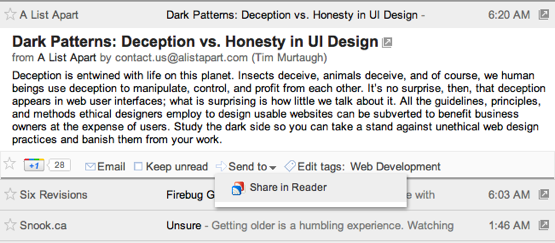
First, you’ll need an account with a bookmarking service. Delicious is free, but Pinboard is well worth supporting. After you’ve signed up, go into “Reader settings” in the top-right corner, click “Send To”, and “Create a custom link” at the bottom. Add one of these as your URL:
http://delicious.com/save?url=${url}&title=${title}¬es=${source}https://pinboard.in/add?&url=${url}&title=${title}&description=${source}
&tags=readerIf you want to go all in, name it “Share in Reader” and give it this icon URL:
http://www.google.com/reader/ui/favicon.icoGet back to Reader and now you’ll have a familiar “Share in Reader” option at the bottom of each article. When you share something, there’s a field to enter comments, although two-way conversation isn’t possible.
You can also use bookmarklets to share any page you happen to visit, just like old times. Drag Delicious or Pinboard into your bookmark bar.
Give your friends your new feed, which will look like one of the following:
http://delicious.com/v2/rss/usernamehttp://feeds.pinboard.in/rss/u:username/t:readerIf you want to keep your shared links from being discoverable, you can dig up a private feed link for these services as well.
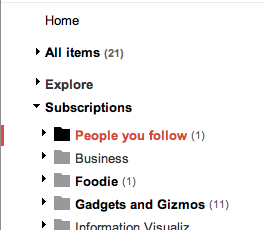
Have your friends create their own, store them in a “People you follow” folder, and you’re back to good.
A downside of this is that it can take an hour or two for the feeds to refresh. But if you want to resist the will of a mighty company like Google, while continuing to use their service, it’s going to be an uphill battle.
I am still able to share items by using my Google Reader app (MobileRSS) on the iPhone. They appear on the shared items page and on the RSS. Therefore, I imagine that its possible to use the same tecnique you are describing here but with Google Reader’s own API, as it is clearly not disabled.
So, it seems to me that essentially, Google has simply removed the Share button without removing the back-end functionality. I hope they keep it this way.
How long till a Greasemonkey script appears that restores the Share button? :D
YOU RULE
So I started typing a comment about how sharing can be accomplished using Bundles, and then I found a post on the Google Reader Blog that explains it better: http://googlereader.blogspot.com/2009/05/life-is-great-bundle-of-little-things.html
Anyway, looks like you could create a tag specifically for sharing, and then create a Bundle consisting of that tag and email the feed to that Bundle out to your fellow reader enthusiasts. Any articles you tag with your special sharing tag will get added to that bundle feed.
This seems to be phased out too. While you can view your own bundles, other people cannot any longer.
google reader and google plus will get about as much of my attention after this as myspace does.